Using Categorical Covariates with AddiVortes
John Paul Gosling, Adam Stone, and Andy Iskauskas
2026-09-11
Source:vignettes/categorical.Rmd
categorical.RmdThis vignette explains how AddiVortes handles
categorical covariates — variables that take a discrete
set of named levels, such as region, product type, or treatment group.
Because Voronoi tessellations require numerical distances between
points, categorical variables need a distance measure.
AddiVortes offers two approaches, controlled by the
cat.onehot argument:
-
One-hot encoding (
cat.onehot = TRUE, the default): each categorical variable is expanded into binary indicator columns, and distances are Euclidean. -
Eskin distance (
cat.onehot = FALSE): categories are kept as a single integer-coded column, and mismatches use the Eskin et al. (2002) distance.
Both approaches are applied automatically to any column in
x that is of type character or
factor. You do not need to pre-process your data.
1. What is One-Hot Encoding?
A categorical variable with d distinct levels cannot be treated as a number because there is no natural ordering or magnitude between categories. For example, assigning “North” = 1, “South” = 2, “East” = 3, “West” = 4 would incorrectly imply that “West” is four times “North”.
One-hot encoding converts a categorical variable with d levels into d − 1 binary (0/1) indicator columns. One level is chosen as the reference level (by convention, the first level in alphabetical order), and the remaining d − 1 levels each receive their own column:
| Level | region_North |
region_South |
region_West |
|---|---|---|---|
| East | 0 | 0 | 0 |
| North | 1 | 0 | 0 |
| South | 0 | 1 | 0 |
| West | 0 | 0 | 1 |
The reference level (“East” here, as the alphabetically first) is represented by all zeros. Using d − 1 rather than d columns avoids perfect collinearity while retaining full information about group membership.
2. The catScaling Parameter
After one-hot encoding, each indicator column takes values 0 or 1,
while continuous covariates are normalised to the range [−0.5, 0.5]. If
catScaling = 1 (the default), the binary jump from 0 to 1
has a magnitude comparable to the full range of a normalised continuous
covariate, giving categorical and continuous covariates roughly equal
influence on the Voronoi tessellation distances.
You can adjust this with the catScaling argument:
-
catScaling > 1: gives categorical differences more weight than continuous differences. -
catScaling < 1: gives categorical differences less weight, making the model rely more heavily on continuous covariates.
The column name for each binary indicator follows the pattern
<original_column>_<level>. For example, a
column region with levels "East",
"North", "South", "West" produces
columns region_North, region_South,
region_West (with "East" as reference).
catScaling only applies when
cat.onehot = TRUE. With Eskin distance it has no
effect.
3. Eskin Distance (cat.onehot = FALSE)
Instead of expanding categories into binary columns, you can keep
each categorical covariate as a single integer-coded column and measure
mismatches with Eskin distance (Eskin et al., 2002).
Set cat.onehot = FALSE when calling
AddiVortes():
fit_eskin <- AddiVortes(
  y = y_train,
  x = x_train,
  cat.onehot = FALSE,
  showProgress = FALSE
)
For a categorical variable with d levels, the squared Eskin contribution between two observations is:
- 0 if the category levels match;
- 2 / d² if the category levels differ.
So a mismatch on a binary covariate (d = 2) costs 2/4 = 0.5, while a mismatch on a four-level covariate costs 2/16 = 0.125. High-cardinality categories therefore contribute less to the overall distance when they disagree, which reflects the idea that a random mismatch is more likely when there are many levels.
Because the covariate is not expanded, the model dimension stays the same as the number of original columns. That can be attractive when categories have many levels and one-hot encoding would create a large number of binary columns.
4. Choosing Between One-Hot and Eskin
One-hot (cat.onehot = TRUE) |
Eskin (cat.onehot = FALSE) |
|
|---|---|---|
| Representation | d − 1 binary columns per categorical variable | One integer-coded column per categorical variable |
| Distance | Euclidean on the binary indicators | Eskin: mismatch cost 2/d² |
| Weighting | Controlled by catScaling
|
Built into the 2/d² formula; catScaling
ignored |
| High cardinality | Creates many columns | Keeps one column; mismatches are down-weighted |
| Prediction metadata | Encoding stored in fit$catEncoding
|
Categories converted to numeric codes on the fly |
| Unseen levels | Treated as the reference level | Prefer factors with a fixed level set so codes stay consistent |
Practical guidance:
- Use one-hot (the default) when you want an explicit, tunable weight for categorical differences, or when there are few levels per variable.
- Use Eskin when categories have many levels, when you want to avoid expanding the covariate dimension, or when you prefer a mismatch cost that shrinks with cardinality.
- For Eskin fits, supply categorical covariates as
factors with a consistent level set in training and prediction data so integer codes align.
5. A Synthetic Example
We create a dataset of 400 observations with two continuous covariates and two categorical covariates. The response variable depends on all four:
library(AddiVortes)

set.seed(123)
n <- 400

x <- data.frame(
  age = rnorm(n, mean = 40, sd = 10),
  income = runif(n, 20, 120), # income in thousands
  region = sample(c("East", "North", "South", "West"), n, replace = TRUE),
  product = sample(c("Basic", "Premium", "Deluxe"), n, replace = TRUE),
  stringsAsFactors = FALSE
)

# True response: depends on continuous and categorical variables
region_effect <- ifelse(x$region == "North", 5,
  ifelse(x$region == "South", -5, 0)
)
product_effect <- ifelse(x$product == "Premium", 10,
  ifelse(x$product == "Deluxe", 20, 0)
)

y <- 0.3 * x$age +
  0.1 * x$income +
  region_effect +
  product_effect +
  rnorm(n, sd = 3)
Note that region has 4 levels and product
has 3 levels. With one-hot encoding they become 3 and 2 binary columns
respectively — for a total of 5 extra columns alongside the 2 continuous
covariates. With Eskin distance they remain 2 categorical columns.
6. Inspecting the Encoding
We can call the internal encoding function directly to see exactly what the one-hot encoded matrix looks like before fitting the model.
# Show the first few rows of x before encoding
head(x, 5)
#>        age   income region product
#> 1 34.39524 67.06818   East Premium
#> 2 37.69823 56.58455   West   Basic
#> 3 55.58708 32.12721  North Premium
#> 4 40.70508 24.69937   East Premium
#> 5 41.29288 46.27963   East   Basic
# Manually inspect the encoding applied by AddiVortes
enc_result <- AddiVortes:::encodeCategories_internal(x, catScaling = 1)
head(enc_result$encoded, 5)
#>           age   income region_North region_South region_West product_Deluxe
#> [1,] 34.39524 67.06818            0            0           0              0
#> [2,] 37.69823 56.58455            0            0           1              0
#> [3,] 55.58708 32.12721            1            0           0              0
#> [4,] 40.70508 24.69937            0            0           0              0
#> [5,] 41.29288 46.27963            0            0           0              0
#>      product_Premium
#> [1,]               1
#> [2,]               0
#> [3,]               1
#> [4,]               1
#> [5,]               0
The columns produced are: - age and income
(unchanged continuous columns) - region_North,
region_South, region_West (3 indicators;
“East” is the reference) - product_Deluxe,
product_Premium (2 indicators; “Basic” is the
reference)
All binary columns take values 0 or catScaling (here 1).
When catScaling = 1 all indicator columns and the
continuous columns span a comparable range inside the model.
7. Fitting the Model (One-Hot)
Fitting the model is identical to the standard workflow — simply pass
the data frame with character or factor columns directly.
AddiVortes handles the encoding internally
(cat.onehot = TRUE is the default).
# Split into training and test sets
set.seed(42)
train_idx <- sample(n, 300)

x_train <- x[train_idx, ]
y_train <- y[train_idx]
x_test <- x[-train_idx, ]
y_test <- y[-train_idx]

fit <- AddiVortes(
  y = y_train,
  x = x_train,
  m = 50,
  totalMCMCIter = 500,
  mcmcBurnIn = 100,
  catScaling = 1, # default: binary columns span [0, 1]
  cat.onehot = TRUE, # default: one-hot encoding
  showProgress = FALSE
)
cat("In-sample RMSE:", round(fit$inSampleRmse, 3), "\n")
#> In-sample RMSE: 2.206

# The catEncoding field records how the encoding was built
cat("\nReference levels used:\n")
#>
#> Reference levels used:
for (j in fit$catEncoding$catColIndices) {
  orig_col <- fit$catEncoding$origColNames[j]
  ref_lev <- fit$catEncoding$colEncodings[[j]]$levels[1]
  all_lev <- fit$catEncoding$colEncodings[[j]]$levels
  cat(
    " ", orig_col, ": reference =", ref_lev,
    "| all levels:", paste(all_lev, collapse = ", "), "\n"
  )
}
#>   region : reference = East | all levels: East, North, South, West
#>   product : reference = Basic | all levels: Basic, Deluxe, Premium
The encoding metadata is stored in fit$catEncoding and
is automatically used when making predictions, so new data passed to
predict() is encoded with exactly the same reference
levels.
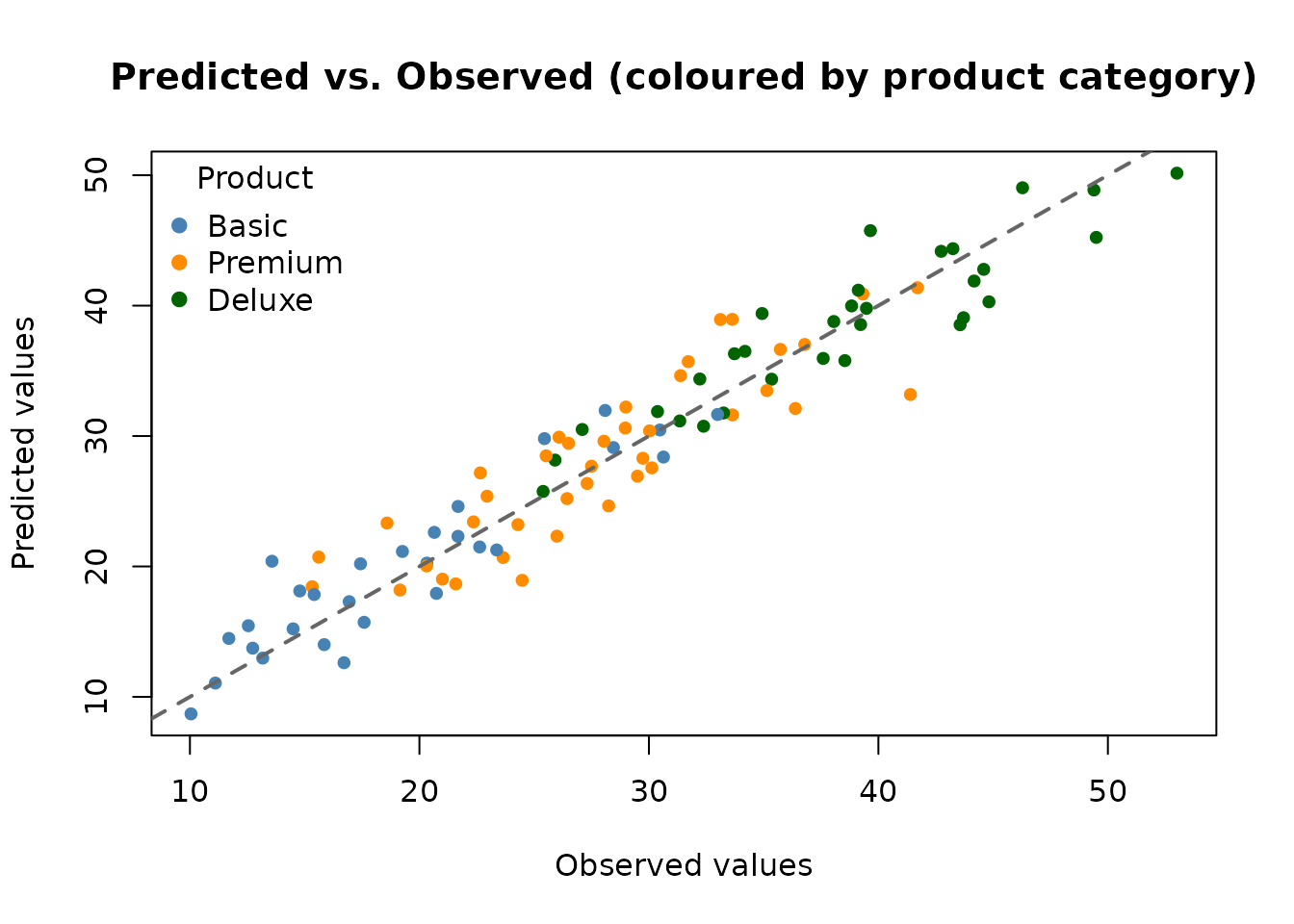
8. Making Predictions
Predictions on new data work in the usual way. If the new data contains the same categorical levels as the training data, the encoding is applied consistently.
preds <- predict(fit, x_test, showProgress = FALSE)
rmse_test <- sqrt(mean((y_test - preds)^2))
cat("Test RMSE:", round(rmse_test, 3), "\n")
#> Test RMSE: 3.085
# Colour observations by product category
prod_cols <- c("Basic" = "steelblue", "Premium" = "darkorange", "Deluxe" = "darkgreen")
point_cols <- prod_cols[x_test$product]

plot(y_test, preds,
  col = point_cols, pch = 19, cex = 0.8,
  xlab = "Observed values",
  ylab = "Predicted values",
  main = "Predicted vs. Observed (coloured by product category)"
)
abline(0, 1, lwd = 2, lty = 2, col = "grey40")
legend("topleft",
  legend = names(prod_cols),
  col = prod_cols,
  pch = 19, title = "Product", bty = "n"
)
9. Handling Unseen Category Levels
At prediction time under one-hot encoding, if a new observation
contains a category level that was not seen during training,
AddiVortes treats it as the reference
level (all binary indicators set to zero). This is a sensible
default: the model cannot infer anything about a previously unseen level
and falls back to the baseline.
# Create a test point with an unseen product level "Luxury"
x_new <- data.frame(
  age = 45,
  income = 80,
  region = "North",
  product = "Luxury", # unseen level
  stringsAsFactors = FALSE
)
pred_new <- predict(fit, x_new, showProgress = FALSE)10. Effect of catScaling
The catScaling parameter controls how much influence
categorical differences have in the distance calculations under one-hot
encoding. Here we fit two models — one with catScaling = 1
(equal weight) and one with catScaling = 2 (double weight
for categorical differences) — and compare their test RMSEs.
fit_cs2 <- AddiVortes(
  y = y_train,
  x = x_train,
  m = 50,
  totalMCMCIter = 500,
  mcmcBurnIn = 100,
  catScaling = 2, # give categorical differences twice as much weight
  cat.onehot = TRUE,
  showProgress = FALSE
)
preds_cs2 <- predict(fit_cs2, x_test, showProgress = FALSE)
cat("Test RMSE (catScaling = 1):", round(rmse_test, 3), "\n")
#> Test RMSE (catScaling = 1): 3.085
cat("Test RMSE (catScaling = 2):", round(sqrt(mean((y_test - preds_cs2)^2)), 3), "\n")
#> Test RMSE (catScaling = 2): 2.995
In this example, the true response has substantial category effects
(up to ±20 units for product type) relative to the continuous effects,
so increasing catScaling may help the model focus more on
categorical group membership.
11. Comparing One-Hot and Eskin Distances
We now fit the same training data with Eskin distance and compare
test RMSE with the default one-hot model. For a fair comparison we keep
m, MCMC length, and burn-in identical.
# Use factors with fixed levels so integer codes stay aligned at prediction
x_train_f <- x_train
x_test_f <- x_test
x_train_f$region <- factor(x_train$region, levels = c("East", "North", "South", "West"))
x_train_f$product <- factor(x_train$product, levels = c("Basic", "Deluxe", "Premium"))
x_test_f$region <- factor(x_test$region, levels = levels(x_train_f$region))
x_test_f$product <- factor(x_test$product, levels = levels(x_train_f$product))

fit_eskin <- AddiVortes(
  y = y_train,
  x = x_train_f,
  m = 50,
  totalMCMCIter = 500,
  mcmcBurnIn = 100,
  cat.onehot = FALSE, # Eskin distance on integer-coded categories
  showProgress = FALSE
)
preds_eskin <- predict(fit_eskin, x_test_f, showProgress = FALSE)
rmse_eskin <- sqrt(mean((y_test - preds_eskin)^2))
cat("Test RMSE (one-hot, catScaling = 1):", round(rmse_test, 3), "\n")
#> Test RMSE (one-hot, catScaling = 1): 3.085
cat("Test RMSE (Eskin):                   ", round(rmse_eskin, 3), "\n")
#> Test RMSE (Eskin):                    3.107
cat("In-sample RMSE (one-hot):", round(fit$inSampleRmse, 3), "\n")
#> In-sample RMSE (one-hot): 2.206
cat("In-sample RMSE (Eskin):  ", round(fit_eskin$inSampleRmse, 3), "\n")
#> In-sample RMSE (Eskin):   2.129
plot(y_test, preds,
  col = adjustcolor("steelblue", alpha.f = 0.7), pch = 19, cex = 0.8,
  xlab = "Observed values",
  ylab = "Predicted values",
  main = "One-hot vs Eskin: predicted vs observed"
)
points(y_test, preds_eskin,
  col = adjustcolor("darkorange", alpha.f = 0.7), pch = 17, cex = 0.8
)
abline(0, 1, lwd = 2, lty = 2, col = "grey40")
legend("topleft",
  legend = c("One-hot", "Eskin"),
  col = c("steelblue", "darkorange"),
  pch = c(19, 17), bty = "n"
)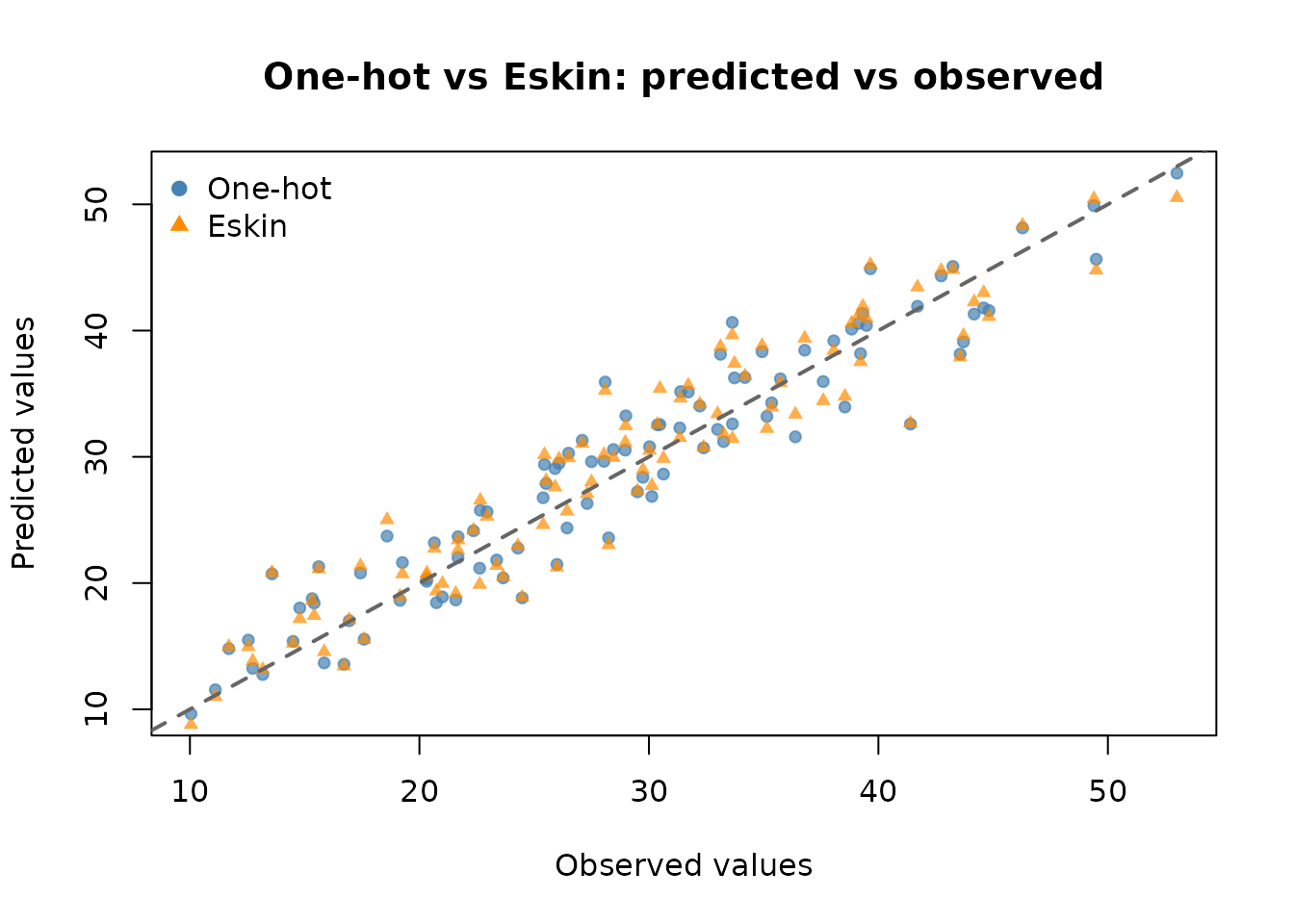
Neither method is universally better: one-hot gives a flexible
Euclidean embedding whose weight you can tune with
catScaling, while Eskin keeps the original dimension and
scales mismatch cost by cardinality. On a given problem, comparing the
two on a held-out set (as above) is a practical way to choose.
12. Summary of Key Points
- Pass
characterorfactorcolumns directly in the covariate data frame;AddiVortesdetects them automatically. -
One-hot encoding (
cat.onehot = TRUE, default): a categorical variable with d levels is converted to d − 1 binary (0/1) indicator columns. -
Eskin distance (
cat.onehot = FALSE): categories stay as one integer-coded column; a mismatch costs 2/d² (Eskin et al., 2002). - The reference level under one-hot is the alphabetically first level; all its indicators are zero.
- Indicator columns are named
<original_column>_<level>(e.g.product_Premium). -
catScaling(default 1) controls the weight given to categorical differences under one-hot encoding. It is ignored whencat.onehot = FALSE. - One-hot encoding metadata is stored in
fit$catEncodingand applied automatically to new data inpredict(). - Unseen category levels at prediction time under one-hot encoding are treated as the reference level.
- For Eskin fits, prefer
factorcovariates with a fixed level set shared by training and prediction data.